
Building sophisticated forms in WordPress often involves repetitive work. Fields need to be added, layouts arranged, conditional logic configured, notifications created, and settings refined before a form is ready to use.
Novamira makes it possible to complete much of that work using natural language while continuing to build with WS Form.
Instead of navigating through each configuration screen manually, you can describe what you need and let an AI assistant use genuine WS Form functionality to create and update the form directly inside WS Form.
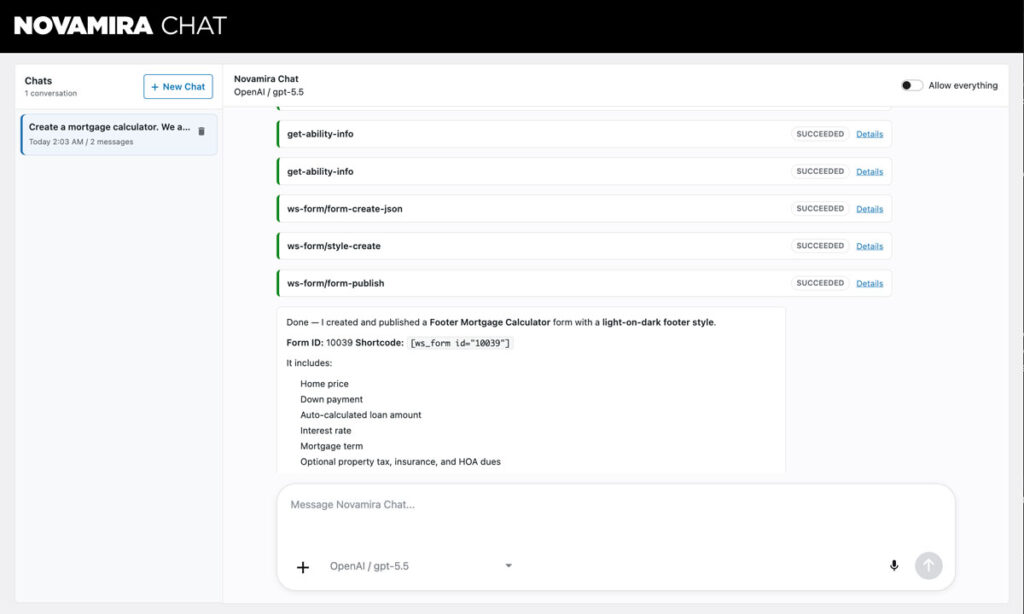
Build a Form in WS Form
Create a vehicle reservation form in WS Form. Ask whether the vehicle is company-owned or personal. Show a registration field for company vehicles and insurance fields for personal vehicles. Send submissions to the site administrator and publish the form.
The result is not generated HTML, a temporary prototype, or a form that exists outside your normal workflow. It is a real WS Form project that remains fully editable, maintainable, and ready to evolve as requirements change.
WS Form provides the professional form-building platform. Novamira gives compatible AI assistants a conversational way to work with it. Together, they provide a faster and maintainable solution for building forms in WordPress.
How Novamira and WS Form Work Together
WS Form exposes a comprehensive collection of WordPress Abilities under the ws-form category.
When paired with Novamira, those abilities become available to compatible AI agents through the WordPress Abilities API and MCP, or Model Context Protocol.
This gives an AI assistant access to real WS Form tools. Rather than generating instructions or code that must be recreated later, it can perform supported tasks directly within WS Form.
| Traditional Workflow | Using Novamira With WS Form |
|---|---|
| Add fields individually | Describe the fields you need in plain English |
| Arrange layouts manually | Ask the assistant to create the initial WS Form layout |
| Build conditional logic step by step | Describe when fields should be shown or hidden |
| Configure actions individually | Ask the assistant to add or update notifications and other actions |
| Make repetitive changes across a form | Request targeted updates through a conversation |
| Locate and review submissions manually | Ask for submission or performance information |
WS Form remains the form builder throughout the process. Novamira simply provides another way to use its functionality.
What Is Novamira?
Novamira is a plugin for WordPress that acts as an MCP server for AI agents. It discovers WordPress Abilities registered by plugins and allows compatible AI clients to invoke those abilities securely.
You can interact with Novamira through its built-in Chat interface inside wp-admin, Novamira Visual, or external MCP clients such as Claude Desktop, Cursor, and other compatible AI tools.
When WS Form is installed and Include in MCP Discovery is enabled, Novamira automatically discovers the abilities registered by WS Form. No custom middleware or glue code is required for standard use.
Why Use Novamira With WS Form?
WS Form already provides the functionality needed to build everything from simple contact forms to sophisticated business workflows. Novamira helps you use that functionality more quickly by turning natural language requests into actions within WS Form.
For developers, agencies, freelancers, and site owners, this changes the conversation from “Which settings do I need to configure?” to “Build this in WS Form.”
The assistant can handle repetitive setup work while you remain responsible for the user experience, business rules, integrations, accessibility, security, and final configuration.
- Build with more than 65 WS Form field types.
- Create responsive layouts using the WS Form Layout Editor.
- Add conditional logic, calculations, repeaters, and multi-step workflows.
- Configure email notifications, integrations, APIs, and other actions.
- Create and assign reusable WS Form styles.
- Review submissions, notes, statistics, and performance information.
- Continue editing every form directly inside WS Form.
This approach reduces development time without creating a separate or difficult-to-maintain form implementation.
Create and Manage Forms
Novamira can use WS Form abilities to perform everyday form management tasks, including:
- List existing forms.
- Create a WS Form project from a natural language description.
- Retrieve a form as structured JSON.
- Update an existing form.
- Publish or draft forms.
- Clone forms.
- Delete and restore forms.
- Generate shortcode or block markup for embedding.
This makes it possible to move from an idea to a working WS Form project without leaving your AI conversation.
Work With Form Structure
An AI assistant can understand the internal structure of a WS Form project. It can work with tabs, sections, fields, actions, and conditional logic, allowing existing forms to evolve instead of being rebuilt.
You could ask it to insert a Company field after Email, add another notification, revise the conditional logic for a quotation form, or adapt an existing form for a new purpose.
Actions such as email notifications remain separate from general form settings, allowing targeted changes to be made without affecting unrelated configuration.
Review Submissions and Performance
Novamira can also help you work with a form after it has been published.
- List and inspect submissions.
- Create, update, and delete submission notes.
- Retrieve form statistics and performance information.
Instead of searching through the administration interface, you can ask for last month’s submission numbers, review a particular enquiry, or leave a note for another team member.
Create Beautiful Styles With AI
WS Form styling is also available through WordPress Abilities.
When your request involves branding, colours, typography, spacing, border radius, or overall appearance, an AI assistant can work directly with WS Form styles instead of changing individual form settings.
Available style abilities include:
- List available styles.
- Retrieve complete style information, including the root palette.
- Create styles from scratch or from templates such as standard-light and standard-dark.
- Update existing styles.
- Delete styles.
A typical workflow is to create the form in WS Form first, then ask the assistant to create or assign a style that matches your brand. Styles can be assigned to an individual form or used as the site default or conversational default where appropriate.
This separation keeps the form structure focused on functionality while allowing branding requests to be handled independently.
Example Prompts for WS Form
The following examples show how Novamira can help create, update, style, and manage projects within WS Form.
Create a Contact Form
Create a contact form in WS Form with Name, Email, Phone, Message, spam protection, and an email notification to the site administrator.
Build a Lead Qualification Form
Create a lead qualification form in WS Form that asks for company size, budget, project type, and preferred start date. Use conditional logic to show additional questions for projects with a budget above $10,000.
Create an Employee Onboarding Form
Build an employee onboarding form in WS Form with personal details, emergency contact information, equipment requirements, document uploads, and an email notification to Human Resources.
Build an Event Registration Form
Create an event registration form in WS Form with attendee information, ticket quantity, dietary requirements, accessibility requirements, and a confirmation email.
Create a Customer Survey
Build a customer satisfaction survey in WS Form with rating fields, conditional follow-up questions for low scores, and an optional comments field.
Adapt an Existing Form
Clone our Demo Request form in WS Form and adapt it into a webinar registration form. Keep the existing branding and email notifications.
Apply Branding
Create a WS Form style using our brand colours (#0B1F3A and #F5C542), rounded corners, modern typography, and assign it to form #12.
Update a Form
Add a Company field immediately after Email on the Partnership Enquiry form and update the notification email to include the new field.
Review Performance
Show me last month’s submission statistics for our Contact form in WS Form and identify which day received the most enquiries.
Build, Style and Embed
Create a conversational lead generation form in WS Form that matches our brand colours (#0B1F3A and #F5C542), assign the style, publish the form, then give me both the shortcode and block markup.
Each request works with WS Form rather than creating a separate form outside it. The assistant can configure the project, apply branding, publish it, and generate the markup needed to embed it while the finished form remains fully manageable in WS Form.
Maintainable Forms Built for Real Projects
Generated code can be useful for experimentation, but it often creates additional work when a form needs to be updated, extended, connected to another service, or handed over to a client.
Novamira and WS Form avoid that problem by keeping the entire project within an established form-building environment.
The form can still be edited using the WS Form Layout Editor. Fields can be rearranged, conditional logic can be extended, actions can be updated, styles can be refined, and integrations can be added as the project develops.
This makes the combination suitable for real client work and long-term website maintenance, not just one-off demonstrations of AI-generated content.
AI Accelerates Development Without Replacing Expertise
AI can remove repetitive work, but it does not replace the decisions made by an experienced developer, agency, freelancer, or site owner.
You still control the user experience, business rules, integrations, validation, security, accessibility, and final configuration. Novamira simply provides a faster way to implement those decisions using WS Form.
This is particularly useful when creating the first version of a form, adapting an existing form for another purpose, or making a series of precise updates that would otherwise require repetitive administration work.
Part of WS Form’s AI Ecosystem
Support for Novamira is a natural extension of the AI capabilities available in WS Form.
WS Form supports the WordPress Abilities API and MCP discovery, making its capabilities available to compatible AI environments. It also includes an optional dedicated MCP Server for workflows that benefit from direct access to WS Form.
Novamira provides a broader AI environment for WordPress. It combines conversational AI, visual editing context, plugin discovery through WordPress Abilities, and the ability to continue working with pages after a form has been created.
This gives developers the freedom to choose the AI workflow that best fits each project while continuing to rely on WS Form for the form itself.
Getting Started
- Install WordPress with support for the WordPress Abilities API.
- Install and activate WS Form and Novamira.
- Open WS Form > Settings > AI and enable Include in MCP Discovery.
- To allow the assistant to edit or delete forms and styles, enable Allow Updates and Allow Deletes. These settings are disabled by default.
- Open Novamira Chat, Novamira Visual, or connect your preferred MCP client.
- Describe what you want to create or change in WS Form.
Built for Real Work
Authentication and WordPress permissions still apply. WS Form also allows you to control whether AI can update or delete forms and styles, providing additional safeguards when using AI on production sites.
Novamira is a powerful environment and is well suited to development and staging workflows. Most importantly, it works with genuine WS Form functionality rather than creating disposable HTML that needs to be recreated later.
Build Forms Faster With Novamira and WS Form
Novamira does not replace WS Form. It provides a conversational way to use it.
Instead of spending time repeatedly adding fields, adjusting layouts, configuring actions, and making routine updates, you can describe the result you need and let the assistant carry out supported tasks within WS Form.
WS Form continues to provide the professional form builder, data structure, workflow tools, integrations, submission management, and maintainable administration experience behind every project.
Together, Novamira and WS Form provide a practical way to reduce development time while building sophisticated, maintainable forms for WordPress.
Install WS Form alongside Novamira on a staging site and describe what you want to build. You can then refine the structure, update the functionality, apply your branding, publish the form, and continue managing it through WS Form.
Learn more about WordPress Abilities and the WS Form MCP Server, then visit Novamira to learn more about its AI environment for WordPress.