

AI in WordPress is entering a new phase. What started as open experimentation across plugins is now becoming shared infrastructure. The focus has shifted from “How do we add AI?” to “How do we make intelligence a native part of the platform?”
The WordPress AI Building Blocks initiative reflects that shift. With the Abilities API, MCP Server, and WP AI Client SDK, WordPress is establishing a common foundation for AI that is structured, extensible, and built to last.
WS Form has aligned with this direction from the beginning. With support for the Abilities API, MCP Server, and now the WP AI Client SDK, WS Form is fully aligned as AI moves closer to core, with the SDK proposed for WordPress 7.0.
AI Building Blocks for WordPress
The AI Building Blocks initiative introduces a set of foundational APIs designed to standardize how AI operates inside WordPress. Rather than each plugin implementing its own approach, WordPress is defining shared infrastructure.
The core components include:
Together, these components enable plugins to expose capabilities, interact programmatically, and make AI requests through a unified system.
Abilities API
The Abilities API allows plugins to declare what they can do in a structured, machine-readable format. It creates a shared layer of capability awareness across WordPress.
WS Form integrated with the Abilities API early on. This enables WS Form to:
- Describe its form-building capabilities in a structured format
- Declare available field types
- Expose configurable properties for each field
- Provide a standardized representation of its form configuration model
This approach allows AI systems to reason about WS Form using defined capabilities instead of relying on fragile prompt engineering.
Learn more: WS Form Abilities
MCP Server
The MCP Server enables programmatic interaction with WordPress features through a defined protocol.
WS Form’s MCP Server integration allows AI systems to:
- Build complex forms from a single prompt
- Modify existing forms
- Add, remove, or update fields
- Retrieve form statistics and submission data
- Analyze and provide feedback on form design, such as improving conversions
With support for both the Abilities API and the MCP Server, WS Form was already aligned with the AI Building Blocks vision.
Learn more: WS Form MCP Server
WP AI Client SDK
The WP AI Client SDK provides a standardized interface for making AI requests within WordPress. Rather than each plugin integrating directly with providers such as OpenAI, Anthropic, or Google, the SDK introduces a shared abstraction layer that handles authentication, request formatting, and response handling in a consistent and extensible manner.
In practical terms, the WP AI Client enables developers to send text and image generation requests through a unified API. The underlying provider can vary, but the integration pattern remains the same. This reduces duplication across plugins, improves interoperability, and establishes a coherent architectural foundation for AI inside WordPress.
With the SDK proposed for inclusion in WordPress 7.0, it signals a clear direction for how AI is expected to function at the platform level.
By adopting the WP AI Client, WS Form aligns directly with this emerging standard. Instead of maintaining isolated provider integrations, WS Form now operates on top of the same AI layer that WordPress is formalizing. This increases flexibility as new providers are introduced, simplifies long-term maintenance, and ensures compatibility with other plugins that adopt the same architecture.
The objective is not simply to connect to AI models, but to do so in a way that integrates cleanly with the evolving structure of WordPress. By supporting the WP AI Client SDK, WS Form participates in a shared, future-ready foundation for intelligent functionality across the ecosystem.
How WS Form Now Integrates with the WP AI Client
WS Form now integrates directly with the WP AI Client SDK, expanding its AI capabilities while aligning with the official WordPress AI roadmap.
While we will continue to maintain our OpenAI premium integration, our primary focus moving forward is native integration with the WP AI Client SDK inside WS Form.
There are currently two primary areas of integration:
- Creating forms from an AI prompt using the new Create from AI template
- Using the Make AI Request action to generate content within forms
Create from AI Template
The new Create from AI template allows users to generate complete forms from a natural language prompt. It appears as a new template option on the Add Form admin page.
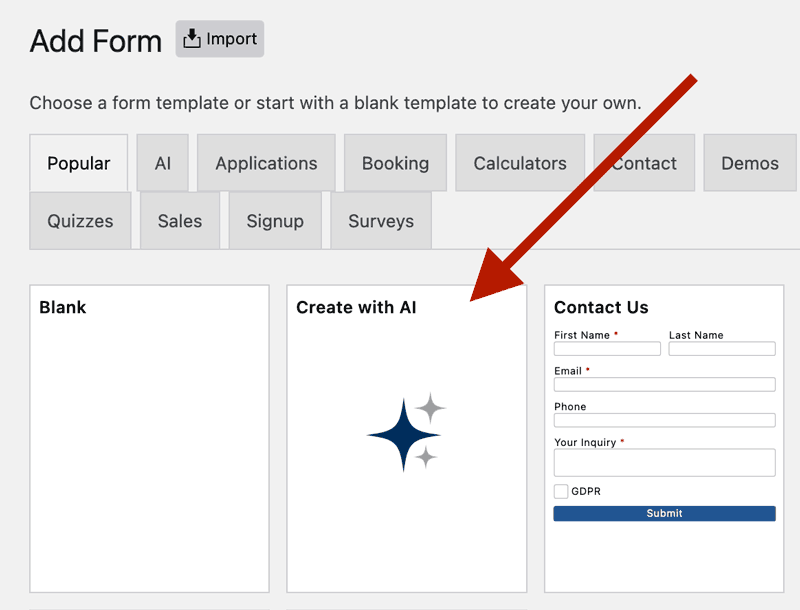
When selected, a modal is displayed where users can describe the form they want to create.
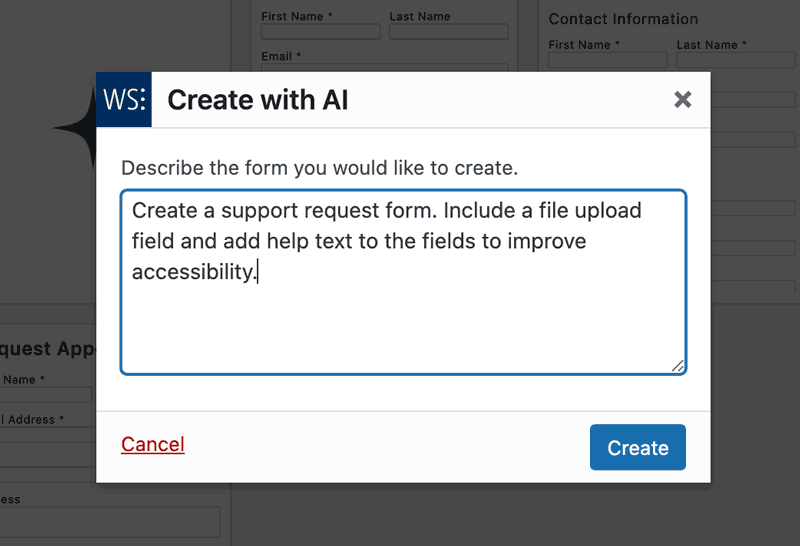
Example prompts:
Create a dog adoption form. Add help text to each field to improve accessibility.
Make me a multi-step job application form, including a PDF file upload field.
I need a registration form for a workshop. Include fields for full name, email, company, job title, and a checkbox to agree to terms and conditions. Add a dropdown for selecting which session they want to attend with options: Morning, Afternoon, or Evening.
Because WS Form already integrates with the Abilities API and MCP Server, the Create from AI template can:
- Build complex multi-page forms
- Configure validation rules automatically
- Preconfigure data grids for select, checkbox, and radio fields
- Add contextual help text to improve accessibility
This is structured form generation grounded in real form architecture. The result is a fully functional form that can be refined further within the WS Form layout editor.
Learn more: Create from AI Template
Make AI Request Action
Make AI Request is an action within WS Form that allows you to send data to an AI provider during form processing.
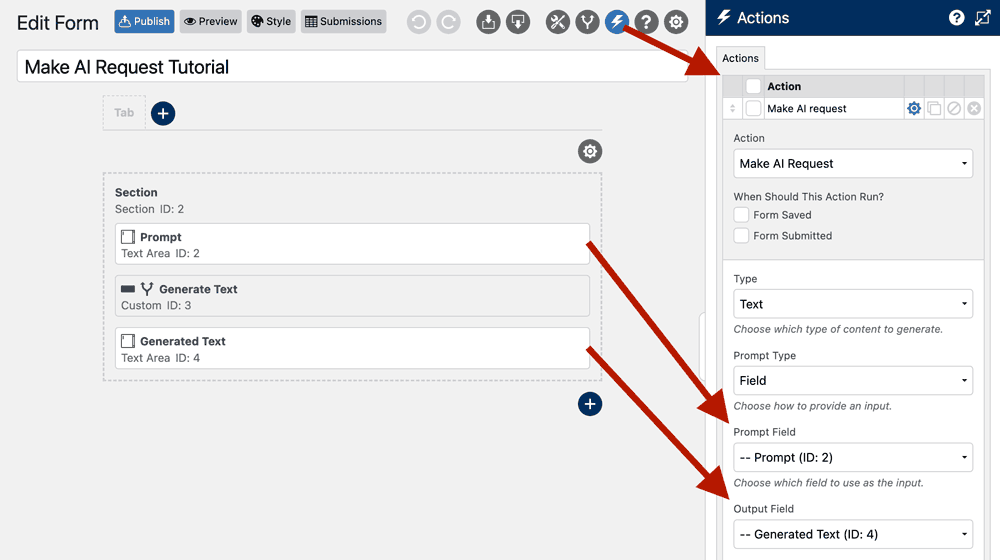
Example use cases include:
- Generating text and images when creating a post using the Post Management premium integration
- Improving copy entered into a textarea field using custom instructions such as “Fix my grammar”
- Creating an avatar image when using the User Management premium integration
- Enabling question and answer functionality on a support page
Learn more: Make AI Request Action
Why This Matters
By integrating with the WP AI Client SDK, WS Form:
- Aligns with the official WordPress AI roadmap
- Reduces reliance on custom provider integrations
- Gains compatibility with future providers supported by core
- Improves long-term stability as WordPress 7.0 approaches
Combined with existing support for the Abilities API and MCP Server, WS Form is positioned as a first-class participant in the AI-enabled WordPress ecosystem.
Looking Ahead
The AI Building Blocks initiative is shaping the future of WordPress development. With support for the Abilities API, MCP Server, and WP AI Client SDK, WS Form is fully aligned with that vision.
As WordPress moves toward 7.0 and AI becomes a native platform capability, WS Form is prepared not only to integrate with AI, but to help define how AI operates within WordPress forms.
As the WP AI Client SDK introduces new features, such as audio generation, WS Form will adopt and extend these capabilities accordingly.