
If you’ve ever tried setting up WordPress form conversion tracking, you’ll know it can get complicated fast.
What should be a simple task, tracking when someone submits a form, often turns into a mix of tag managers, custom scripts, and platform-specific event setups. Even when everything appears to be configured correctly, it’s not always clear whether your conversions are being tracked accurately.
For many site owners, this creates a gap between collecting leads and actually understanding where those leads are coming from.
This is exactly where Conversion Bridge, combined with WS Form, offers a much simpler and more reliable approach.
A Simpler Approach to Conversion Tracking
Conversion Bridge takes a different approach. Instead of requiring you to wire everything together manually, it sits between your website and your analytics tools and handles the communication for you.
Once installed on your WordPress site, it connects to platforms like Google Analytics, Google Ads, Meta Ads, and others. From that point on, it listens for key actions on your site and sends them as structured conversion events.
When used with WS Form, this becomes particularly powerful because form submissions are often the most important conversions you have.
WordPress Form Conversion Tracking Without the Complexity
Traditional WordPress form conversion tracking usually relies on external tools like Google Tag Manager or manually configured event scripts. While these methods can work, they often introduce unnecessary complexity and ongoing maintenance.
Conversion Bridge removes that overhead by handling tracking directly within WordPress. Instead of wiring together multiple tools, you can track WordPress form conversions by simply adding an action inside WS Form.
This approach not only reduces setup time, it also improves reliability. With fewer moving parts, there’s less chance of tracking breaking or data being lost, giving you more confidence in the conversions you see in your analytics and ad platforms.
Turning WS Form Submissions Into Real Data
WS Form already gives you complete control over how your forms behave. Conversion Bridge extends that by making sure every submission can be tracked properly without extra setup.
The integration works through WS Form’s Actions system. Instead of writing code or configuring external tools, you simply add a Conversion Bridge action to your form. Once that’s in place, every submission is automatically recorded as a conversion.
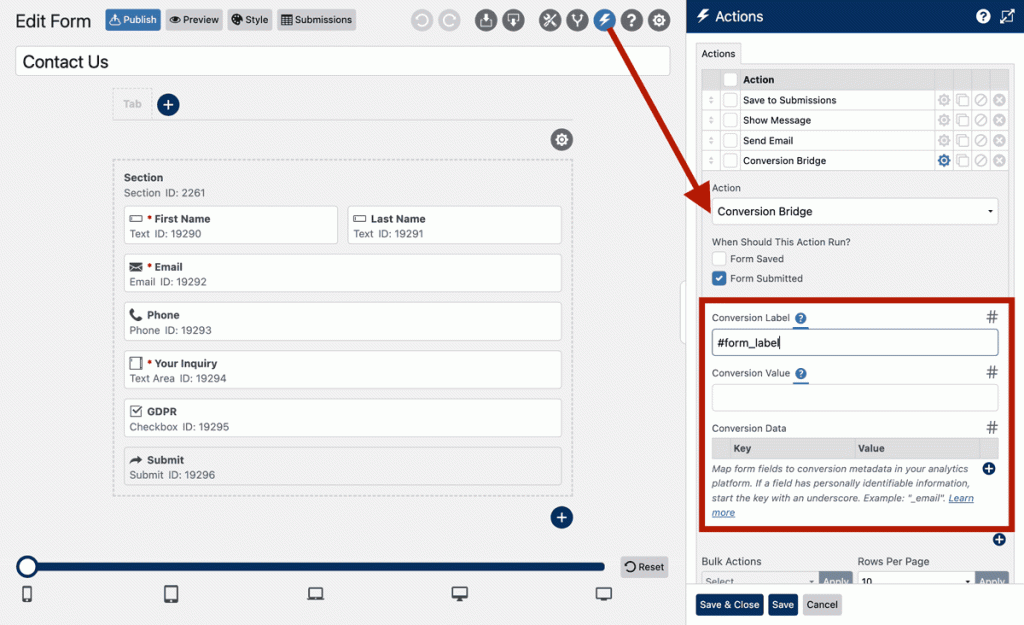
There’s no need to configure triggers, attach scripts, or debug events. The data is sent instantly to the platforms you’ve connected, giving you immediate visibility into what your forms are generating.
Enhanced Tracking for Better Attribution
Basic conversion tracking tells you that a form was submitted. Enhanced tracking tells you more about who converted and what they submitted.
With Conversion Bridge, you can include additional data alongside each form submission. This can include identifiers such as email address or name, as well as values pulled directly from your form fields.
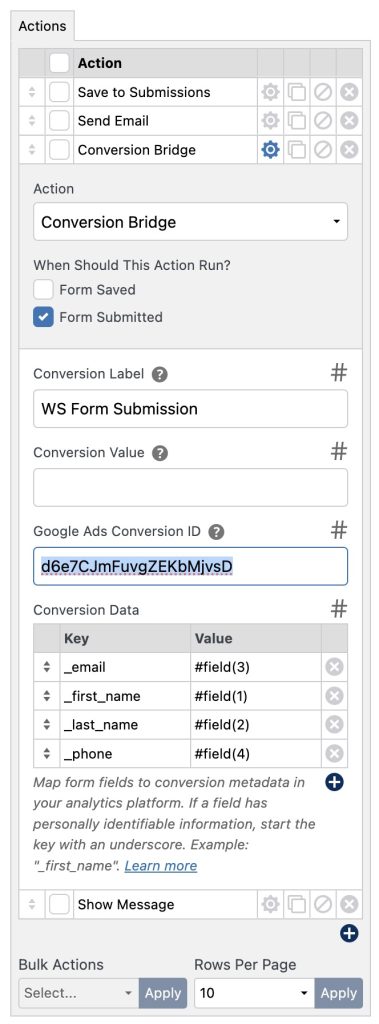
This type of data can significantly improve attribution in advertising platforms. For example, enhanced conversions in platforms like Google Ads and Meta Ads use this information to better match conversions to users, even when traditional tracking methods fall short.
You also have the flexibility to pass custom data, such as selected options, lead types, or internal labels. This makes it easier to understand not just how many conversions you’re getting, but what kind of conversions they are.
If you choose to send personal data, make sure you comply with applicable privacy laws and platform policies.
Why This Matters for Marketing and Analytics
Accurate conversion tracking is what turns traffic into insight.
Without it, you might know how many people visit your site, but not how many take meaningful action. With it, you can see exactly which campaigns, pages, and sources are driving results.
Conversion Bridge helps close that gap by sending structured, reliable conversion data from your forms directly into your analytics and advertising platforms.
Removing the Usual Friction
One of the biggest advantages of using Conversion Bridge with WS Form is how much friction it removes.
There’s no dependency on Google Tag Manager. No need to maintain custom JavaScript. No risk of small configuration errors breaking your tracking. Everything is handled inside WordPress, in an interface you’re already familiar with.
That simplicity also makes it more reliable. When there are fewer moving parts, there’s less that can go wrong.
Getting Started
To use Conversion Bridge with WS Form, start by installing the plugin from https://conversionbridgewp.com/ and activating it on your WordPress site.
Once activated, configure your integrations by connecting the platforms you want to send data to, such as Google Analytics, Google Ads, or Meta Ads. Depending on the platform, this may involve entering tracking IDs, enabling features like enhanced conversions, or choosing how events are named.
Conversion Bridge also includes global settings that control how tracking behaves across your site. This can include enabling enhanced tracking, managing consent-related behavior, and defining default values for events.
After your settings are configured, open your WS Form, add the Conversion Bridge action, and save.
From that point forward, every submission is tracked automatically.
A Better Way to Track What Matters
Form submissions are often the moment where interest turns into opportunity. They represent real users taking meaningful action on your site.
Conversion Bridge makes sure those moments are captured accurately and sent where they matter most, without adding complexity to your workflow.
If you’re using WS Form and want a cleaner, more reliable way to handle WordPress form conversion tracking, this is one of the simplest improvements you can make.