
Conversion Bridge is a WordPress plugin that enables conversion tracking without the need for manual scripts, tags, or complex configuration. It connects your website, including WS Form, directly to analytics and advertising platforms such as Google Analytics, Google Ads, Meta Ads, and more.
By automatically sending form submissions and other user actions as conversion events, Conversion Bridge provides accurate, real-time tracking while simplifying setup and ongoing maintenance.
This guide explains how to track WS Form submissions as conversions using Conversion Bridge.
Prerequisites
Before configuring your form, you must install and activate the Conversion Bridge plugin.
- Download the Conversion Bridge plugin from: https://conversionbridgewp.com
- Install and activate the plugin in WordPress
- Configure your desired integrations, such as Google Analytics, Google Ads, or Meta Ads, in Conversion Bridge settings
Adding Conversion Tracking to a WS Form
Follow these steps to track form submissions as conversions:
1. Edit Your Form
Open your form in WS Form.
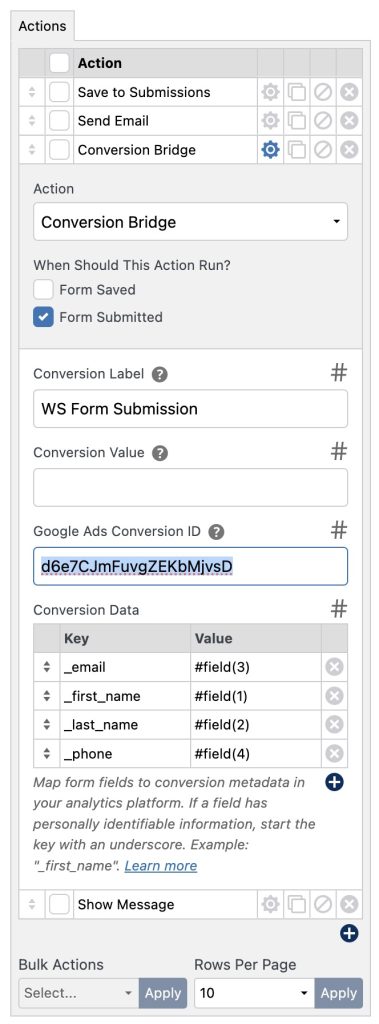
2. Open the Actions Panel
Click the Actions icon at the top of the form layout editor.
3. Add the Conversion Bridge Action
- Click the Add Action icon.
- Select Conversion Bridge.
4. Configure the Action (Optional)
You can optionally configure the following fields:
- Label A name for the conversion event
- Value A numeric value associated with the conversion
- Conversion Data Key/value pairs to send additional data
5. Save & Publish the Form
Save and publish your form to apply the changes.
Form submissions will now be sent to Conversion Bridge as conversion events.
Sending Custom Data
You can pass additional data using the Conversion Data setting.
- Use key/value pairs
- WS Form variables can be used for dynamic values
Example:
plan = #field(123)source = contact_form
Enhanced Conversion Data
Conversion Bridge supports enhanced conversion data.
You can include fields such as:
_email_first_name_last_name_phone
Ensure compliance with applicable privacy regulations when sending personal data.