

This article refers to WS Form version 1.10.60+. These features are subject to change and future improvement.
WS Form is no stranger to innovation in the WordPress ecosystem.
Over the years, we’ve been first to market with integrations like AI-generated forms and Cloudflare Turnstile, always pushing the boundaries of what a form plugin can do.
Now, a new chapter is unfolding with the arrival of MCP, the Model Context Protocol. This technology allows AI agents to securely connect and interact with WordPress. WS Form is once again at the forefront, bridging this new world of intelligent automation by integrating directly with AI clients.
What is Agentic AI?
Agentic AI represents the next evolution in artificial intelligence. It goes beyond simple text generation or chat-based responses and can take real actions. An agentic system can analyze context, plan a series of steps, and carry them out to complete a goal. In WordPress, that might mean creating a new page, installing a plugin, or building a form from scratch without any manual steps.
This new approach transforms AI from being a passive helper into an active participant in how websites are built, managed, and maintained.
Meet Angie
Angie is Elementor’s new agentic AI assistant for WordPress. It can understand your site’s structure, reason through tasks, and take action across content, design, and code. With a single prompt, Angie can perform multi-step workflows such as creating pages, updating settings, managing products, or even building entire layouts.
Unlike traditional AI tools that only generate text or isolated content, Angie uses Model Context Protocol (MCP) technology to interact intelligently with your site. It understands pages, posts, plugins, and templates, allowing it to automate real operations in context. This makes it a true site management assistant rather than a simple content generator.
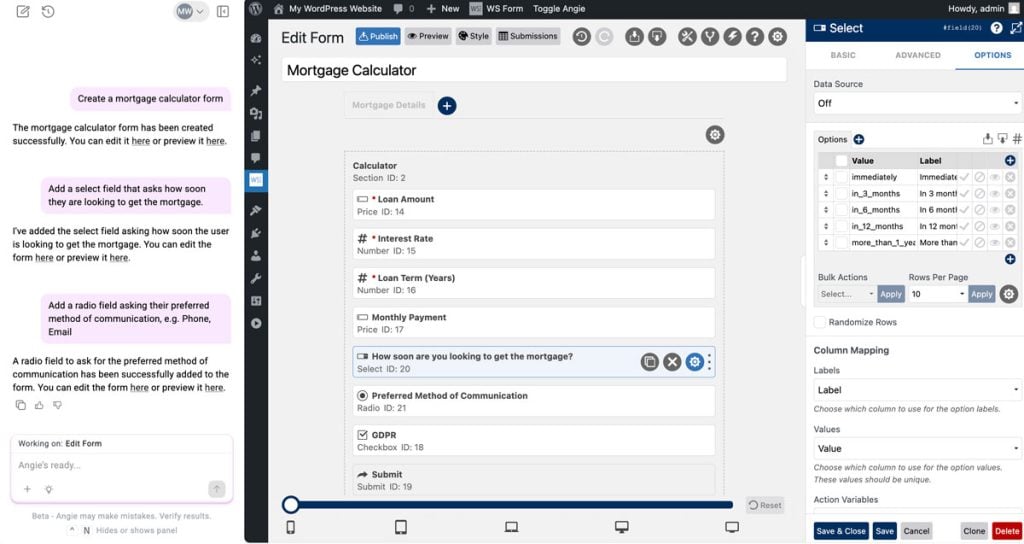
Angie + WS Form
Forms are an essential part of any website. They capture leads, handle payments, manage registrations, and connect visitors to the data that drives business decisions. With our latest integration, we have extended Angie’s capabilities to include full interaction with WS Form.
In short, you can now create and edit forms in WordPress using Angie and WS Form.
Using the Angie SDK, we created a bridge between WS Form’s powerful form-building abilities and Angie’s agentic intelligence. This allows Angie to create, edit, and manage WS Form forms through natural language commands. When you ask Angie to “create a contact form,” it can now communicate directly with WS Form, generate a new form, and populate it with the appropriate fields, all in a single workflow.
The integration exposes WS Form’s structured JSON schema and REST API to Angie through a series of MCP tools. Each tool defines specific form actions, such as creating forms, adding fields, or updating settings. By doing this, Angie can reason through a task and call the right WS Form tool automatically to get the job done.
This collaboration showcases the potential of MCP-based automation within WordPress. It demonstrates how established plugins like WS Form can work seamlessly with next-generation AI systems to deliver smarter, faster workflows for web creators.
Getting Started
Follow these steps to get up and running with Angie and WS Form:
Install WS Form
You can use either WS Form PRO or WS Form LITE with Angie. The PRO edition provides many more field types and functionality such as calculations.
To install WS Form PRO:
- Purchase a license and download the ZIP file.
- Upload it to your site via Plugins > Add New > Upload Plugin.
- Click Activate.
To install WS Form LITE:
- Go to Plugins > Add New in your WordPress admin.
- Search for WS Form.
- Click Install Now, then Activate.
Configure WS Form
Warning: AI-generated form modifications are experimental. While Angie provides powerful automation capabilities, AI technology can produce unexpected or incorrect results. We strongly recommend reviewing all AI-generated form changes before publishing and never using AI-driven edits directly on production forms. Always test modifications in a staging environment first. WS Form and its authors assume no responsibility for data loss, form errors, or other issues arising from AI-assisted actions.
If you want to experiment with making changes to forms (for example, prompting Angie to translate a form), you must first enable this feature.
- Go to WS Form > Settings > AI.
- Under Abilities API, check the Allow Updates setting.
- Click Save Changes.
Install Angie
- Go to Plugins > Add New in your WordPress admin.
- Search for Angie.
- Click Install Now, then Activate.
After activation, click Sign in to Angie to link your site to your Elementor account. You must be signed in so Angie can enable AI-powered services on your site. Angie includes free daily credits. For higher usage or advanced AI capacity, choose an Elementor AI plan.
Once both are installed and active, Angie can immediately begin interacting with WS Form. Try asking Angie to “Create a contact form” or try one of the example prompts below.
Example Prompts
Angie and the WS Form integration are still in beta but already offer a variety of tools that can accelerate form development.
Get Forms
Get a List of the Published Forms
List all published forms in WS Form, including their IDs and labels.
How Many Forms?
Count the total number of forms in WS Form and return the result. Include both published and unpublished forms.
Add Form
Create a Contact Us Form
Create an accessible Contact Us form with helpful field descriptions.
Create a Specific Contact Form
Create a simple contact form with first name, last name, email address, phone number (optional), subject line dropdown (General Inquiry, Support, Sales, Partnership), and a message textarea. Make name and email required. Add help text under the message field saying “Please provide as much detail as possible.”
Dog Adoption Form
Create a dog adoption form.
Job Application
Make me a multi-step job application form, including a PDF file upload field.
Mortgage Calculator
Create a mortgage calculator form
Multi-Lingual Form Creator
Create a contact form in English, then immediately create a Spanish version by cloning it and translating all field labels, placeholders, and help text to Spanish. Give me both shortcodes.
Multi-Step Loan Form
Create a multi-step loan application form with:
Step 1: Personal info (name, email, phone)
Step 2: Employment details (employer, income, job title)
Step 3: Loan details (amount requested, purpose)Include next/previous buttons and make sure all fields are required except the loan purpose.
Support Ticket Form
Design a technical support form with:
– Your name and email (required)
– Product/service affected dropdown: Website, Mobile App, API, Billing, Other
– Priority level radio: Low, Medium, High, Critical
– Issue category dropdown: Bug Report, Feature Request, Access Issue, Performance, Documentation
– Subject line (text field, required)
– Detailed description (textarea, required, placeholder: “Please include
steps to reproduce the issue”)
– Browser/Device info (text field)
– Screenshot upload (file field, optional, help text: “Attachments help us resolve issues faster”)
– Error message (textarea, if applicable)
Workshop Registration
I need a registration form for a workshop. Include fields for full name, email, company, job title, and a checkbox to agree to terms and conditions. Add a dropdown for selecting which session they want to attend with options: Morning, Afternoon, or Evening.
Edit Form
Accessible Help Text
Add help text to all fields to improve accessibility.
Add Multiple Fields
Add three rating fields called Design, Usability, and Support.
Add Placeholders
Add placeholders to the first and last name fields.
Publish a Form
Publish form ID 123.
Translate a Form
Translate form ID 123 into Spanish.
Add Field
Add Fields
Insert an email field before the company field and make it required.
Edit Field
Add Sample Options to a Select Field
Add 20 sample options to the “Programming Language” select field in form ID 123. Use a variety of common languages such as JavaScript, Python, PHP, etc., and include both modern and legacy languages.
Alphabetize Select Options
Reorder the options in the “Country” select field for form ID 123 alphabetically by their label.
Edit a Field
Make the Last Name field required and add help text to it.
Placeholder and Help Text on Email Field
For form ID 5, update the email field to include placeholder text “your@email.com” and make the help text say “We’ll never share your email.”
Statistics
Form View in Past 5 Days
How many times was form ID 123 viewed in the past 5 days?
Saves Last Month
How many times was form ID 123 saved last month?
Submissions in Given Month
How many times was form ID 123 submitted in January 2025?
Total Submission Records
How many submission records does form ID 123 have?
Total Unread Submissions
How many unread submissions does form ID 123 have?
Advice
Ask How to Improve a Form
How could I improve form ID 13?
Get Advice For Poor Performing Form
Show me statistics for form ID 123 from the last 30 days. If it has more than 100 views but less than 10 submissions, suggest improvements to increase the conversion rate.
Help With #calc
Give me an example #calc I can use in WS Form to create a mortgage monthly payment amount.
Scope
Angie can be used with both WS Form LITE and WS Form PRO.
Angie can create forms that include the following field types:
When using WS Form PRO, the following additional field types are available:
The following WS Form features can be used when creating forms:
- Tabs (multi-step forms)
- Calculations (for example,
#calc(#field(1) + #field(2))) - Field settings (such as Default Value, Required, Placeholder, Help, and Invalid Feedback)
- Select, Checkbox, and Radio population
- Field sizing
Security
All abilities exposed to Angie are protected by permission callbacks. User capabilities are checked against standard WS Form capabilities.
Disabling WS Form in Angie
By default, WS Form will automatically detect if Angie is installed and make itself available.
You can disable WS Form in Angie as follows:
- Go to WS Form > Settings > AI.
- Under Angie, uncheck the Enabled setting.
- Click Save Changes.
Summary
WS Form’s integration with Angie marks an exciting step forward for WordPress creators. By combining WS Form’s power with Angie’s agentic intelligence, building and managing forms becomes faster, smarter, and more intuitive than ever. This collaboration shows what is possible when trusted WordPress plugins embrace next-generation AI, helping creators spend less time on setup and more time bringing ideas to life.
The future of WordPress form automation is here, and WS Form is leading the way.