
WooCommerce Variation Variables enable your WS Form forms to react dynamically to the customer’s selected WooCommerce product variation.
For example, if you sell a t-shirt with Size and Color attributes, you can use these variables to show or hide fields, populate hidden fields, display variation-specific information, or perform conditional logic based on the selected variation.
These variables update live as the customer interacts with the WooCommerce variation selectors, making it easy to build dynamic, variation-aware forms directly on your product pages.
Demo
View the WooCommerce Variation Variables demo to see these variables updating live as product variations are selected. The demo shows variation IDs, SKUs, prices, stock status, and attribute values updating in real time as different variation combinations are chosen.
Requirements
- WooCommerce WS Form PRO Product Integrations version 1.2.8 or later.
- WS Form PRO version 1.11.10 or later.
If you are using an older version of WS Form PRO, these variables will not be available.
These are client-side parse variables. They update live in the browser as the customer selects or changes a product variation and are intended for use within forms displayed on WooCommerce product pages.
They also support multiple variable-product forms on the same page. Each form tracks its own selected variation independently.
Available Variables
| Variable | Example Output | Notes |
|---|---|---|
#woocommerce_variation_post_id |
123 |
Returns the post ID of the selected variation. Empty until a complete variation has been selected. |
#woocommerce_variation_sku |
small-green |
Returns the SKU of the selected variation. Empty until a complete variation has been selected. |
#woocommerce_variation_price |
12.34 |
Returns the variation price as a raw numeric value with no currency formatting. |
#woocommerce_variation_in_stock |
yes or no |
Returns whether the selected variation is currently in stock. |
#woocommerce_variation_attribute("attribute") |
Green |
Returns the selected value of the specified variation attribute. |
Keeping Values Up to Date
Because these variables are client-side and update dynamically as the customer changes their variation selection, they should be wrapped in #calc or #text when used in fields so that they continue to refresh automatically.
Use #calc() when you need the value as a number. For example:
#calc(#woocommerce_variation_post_id)
This returns the current variation post ID and automatically updates whenever the customer changes their variation selection.
Use #text() when you want to display a live text value to the customer.
#text(#woocommerce_variation_sku)
To display a formatted variation price using your store currency settings:
#text(#ecommerce_price(#woocommerce_variation_price))
This formats the variation price using your WooCommerce currency settings and updates automatically whenever the variation changes.
In simple terms, #calc() and #text() are what make these values refresh automatically as the shopper changes their variation selection.
Learn more:
Using the Variables
Conditional Logic
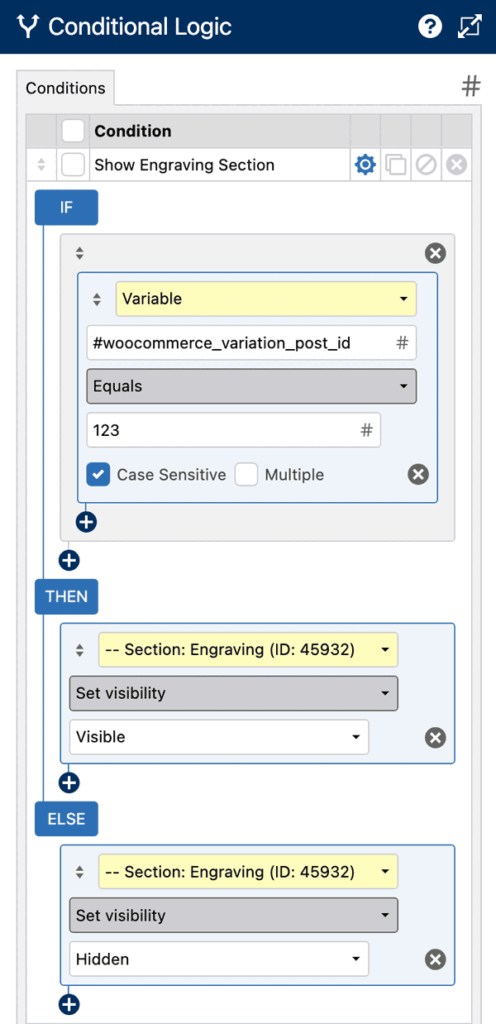
Variation variables can be used in Conditional Logic by selecting Variable as the condition object.
Example: Show an engraving section when the variation post ID is 123
Default Values
You can use variation variables in a field’s Default Value setting.
This is useful when storing variation information with a form submission.
Store the variation post ID
#calc(#woocommerce_variation_post_id)
Store the variation SKU
#text(#woocommerce_variation_sku)
Common use cases include:
- Hidden fields that store the variation ID.
- Hidden fields that store the variation SKU.
- Text fields that display variation-specific information.
Text Editor and HTML Fields
Variation variables can also be used in Text Editor and HTML fields to display live information to shoppers.
Display the selected SKU
You selected SKU: #text(#woocommerce_variation_sku)
Display the selected variation price
Price: #text(#ecommerce_price(#woocommerce_variation_price))
Display the selected color attribute
Selected Color: #text(#woocommerce_variation_attribute("pa_color"))
These values automatically update whenever the customer changes their variation selection.
Tips & Troubleshooting
- Variation ID, SKU, price, and stock variables remain empty until all required variation attributes have been selected.
- The
#woocommerce_variation_attribute("attribute")variable updates immediately when its corresponding attribute dropdown changes. - Use
#calc()or#text()when you need values to refresh automatically as the variation changes. This is not necessary in conditional logic. - Use
#ecommerce_price()to format variation prices using your WooCommerce currency settings.
Using WooCommerce Variation Variables allows your forms to react intelligently to the customer’s product selection, enabling more personalized experiences, smarter conditional logic, and richer WooCommerce product forms.