
Polylang is a multilingual plugin for WordPress that supports server-side string translation.
WS Form integrates directly with Polylang and can automatically register translatable form strings for translation.
Requirements
Polylang integration requires:
Installing Polylang
- Install and activate the Polylang plugin.
- Configure your site languages.
Setting Up Form Translation
- Create or edit a form in WS Form.
- Click the Form Settings icon at the top of the layout editor.
- Click on the Translations tab.
- Check the Enable setting.
- Click Manage in Polylang.
- In the filter toolbar, choose the WS Form group for your form and then click Filter.
- Add translations for each language.
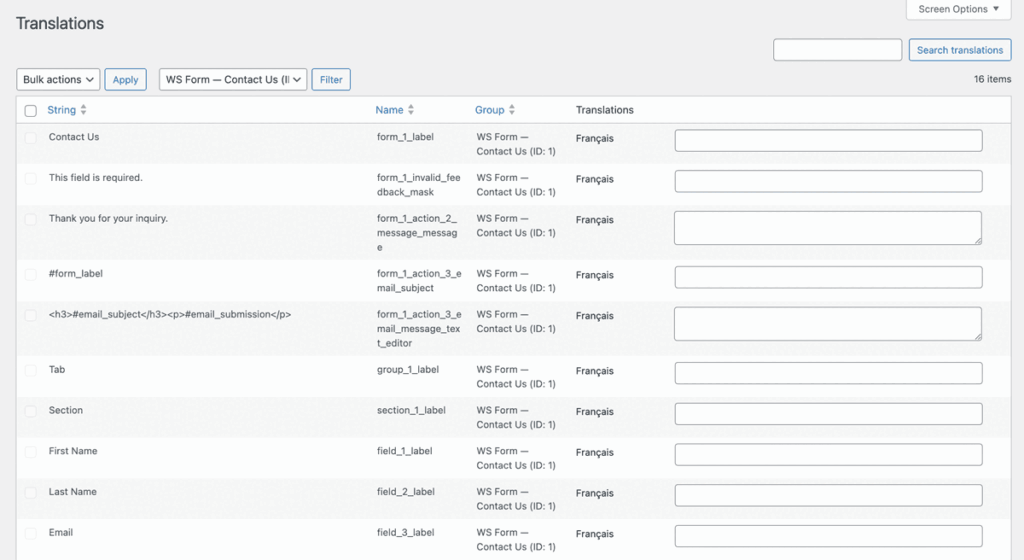
Once translated, forms will automatically display in the active language.
Translation Settings
When Polylang is installed and activated, WS Form adds a Translation tab to Form Settings.
Enable
Enables integration with Polylang and registers strings automatically for the form.
Translate Data Grids
Data grids are used by Select, Checkbox and Radio fields to store the choices shown on the form.
Data grid translation adds one translatable string per Select, Checkbox and Radio choice. The Label column mapping is used for the translation. This can produce a considerable number of translatable strings and therefore you can use this setting to disable translation of data grids.
The following field types include data grids.
Note that only data grids that do not have a data source can be translated. Data sources cause a data grid to be dynamic and for that reason persistent translatable strings cannot be generated.
Manage in Polylang
Click this button to go to the Polylang translations admin page.
What Can Be Translated?
Polylang string translation supports translation of:
- Form settings
- Tab labels
- Section labels
- Field labels
- Field placeholders
- Field help text
- Field default values
- Action settings (e.g. Show Message content or Send Email subject lines)
- ARIA accessibility strings