
Actions run whenever a user clicks a submit or save button. An action could be sending an email, redirecting to a different web page or showing a message. Actions can also involve more complex functionality such as adding a contact to an email marketing platform such as MailChimp, or pushing a message to a Slack channel.
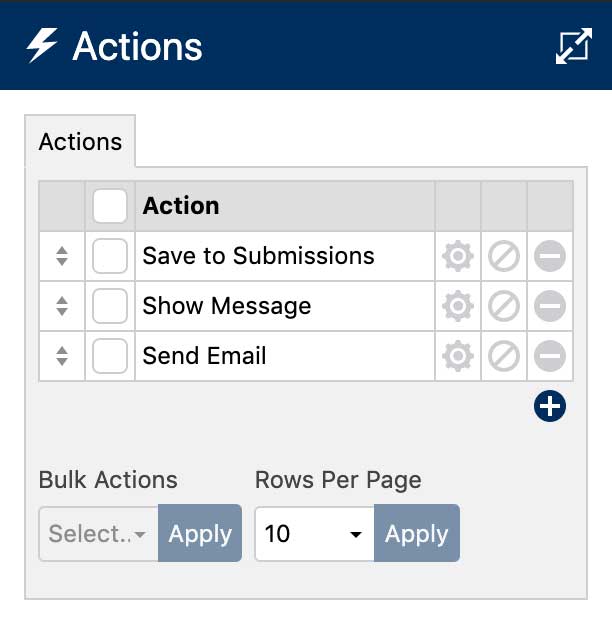
To manage your actions, click the Actions icon at the top of the layout editor. This will open the Actions sidebar:
Adding Actions
- To add an action, click the add icon below the action list.
- Select an action from the pulldown list. Once selected, you can rename that action to anything you like.
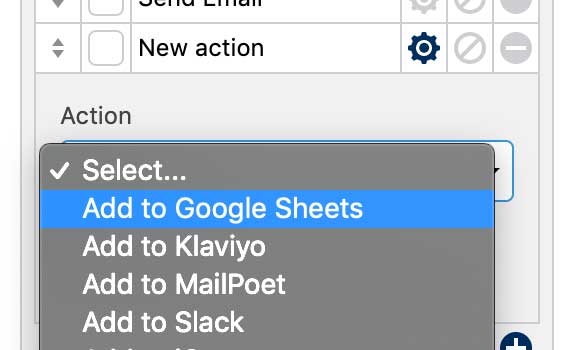
- Configure the action settings. To see a complete list of the available actions and learn more about how to configure them, click here.
Editing Actions
- To edit an action, click the settings icon next to the action name.
- To disable an action, click the disable icon . You can also use conditional logic to disable and enable actions.
- The delete an action, click the delete icon .
The actions included with WS Form PRO are:
- Send Email
- Show Message
- Redirect to a Page
- Save Submissions
- Conversion Tracking
- Run WordPress Hook
- Run WordPress Search
- Run Javascript
- Webhook
- Data Export Request
- Data Erasure Request
Integrations
Premium integrations are also available. Click here to learn more about configuring these actions.

ActiveCampaign
Single Click Forms
Supports All Field Types
Subscribe Contacts
Auto Field Mapping
Auto Tag Mapping
Automation Mapping
Learn More

Airtable
Single Click Forms
Supports All Field Types
Supports Attachments
Push Forms To Tables
Quick Connect
Uses Latest API
Learn More

Amazon S3
Push Files to Amazon S3
Single Click Connect
Custom Upload Path
Preview URLs in Submissions
Session Based Uploads
Uses Latest API
Learn More

Authorize.Net Accept
Accept Credit Cards
Customizable Button
Customizable Pop-up
Uses Latest API
Easy To Install
Easy To Set-Up
Learn More

AWeber
Single Click Forms
Subscribe Contacts
Unsubscribe Contacts
Edit Contacts
Auto Field Mapping
Auto Tag Mapping
Learn More

Bento
Single Click Forms
Subscribe Contacts
Unsubscribe Contacts
Auto Field Mapping
Auto Tag Mapping
Easy To Set-Up
Learn More

Brevo
Single Click Forms
Subscribe Contacts
Unsubscribe Contacts
Edit Contacts
Auto Field Mapping
Quick Connect
Learn More

Campaign Monitor
Single Click Forms
Subscribe Contacts
Unsubscribe Contacts
Edit Contacts
Auto Field Mapping
Quick Connect
Learn More

CleverReach
Single Click Forms
Subscribe Contacts
Blacklist Contacts
Edit Contacts
Auto Field Mapping
Quick Connect
Learn More

Comment Management
Add Comments
Moderation
Set Type
Fully Mappable
Variables
Easy Configuration
Learn More